BetaFree by activation, no card needed

The pro video editor for Reels, TikTok and Shorts.

Reelsmith runs on your own GPU. Cut, grade, animate and caption, with on-device AI and AI agents that edit beside you. Your footage never leaves your PC.

Free during the betaChrome, Edge or Windows 10/11Nothing is uploaded

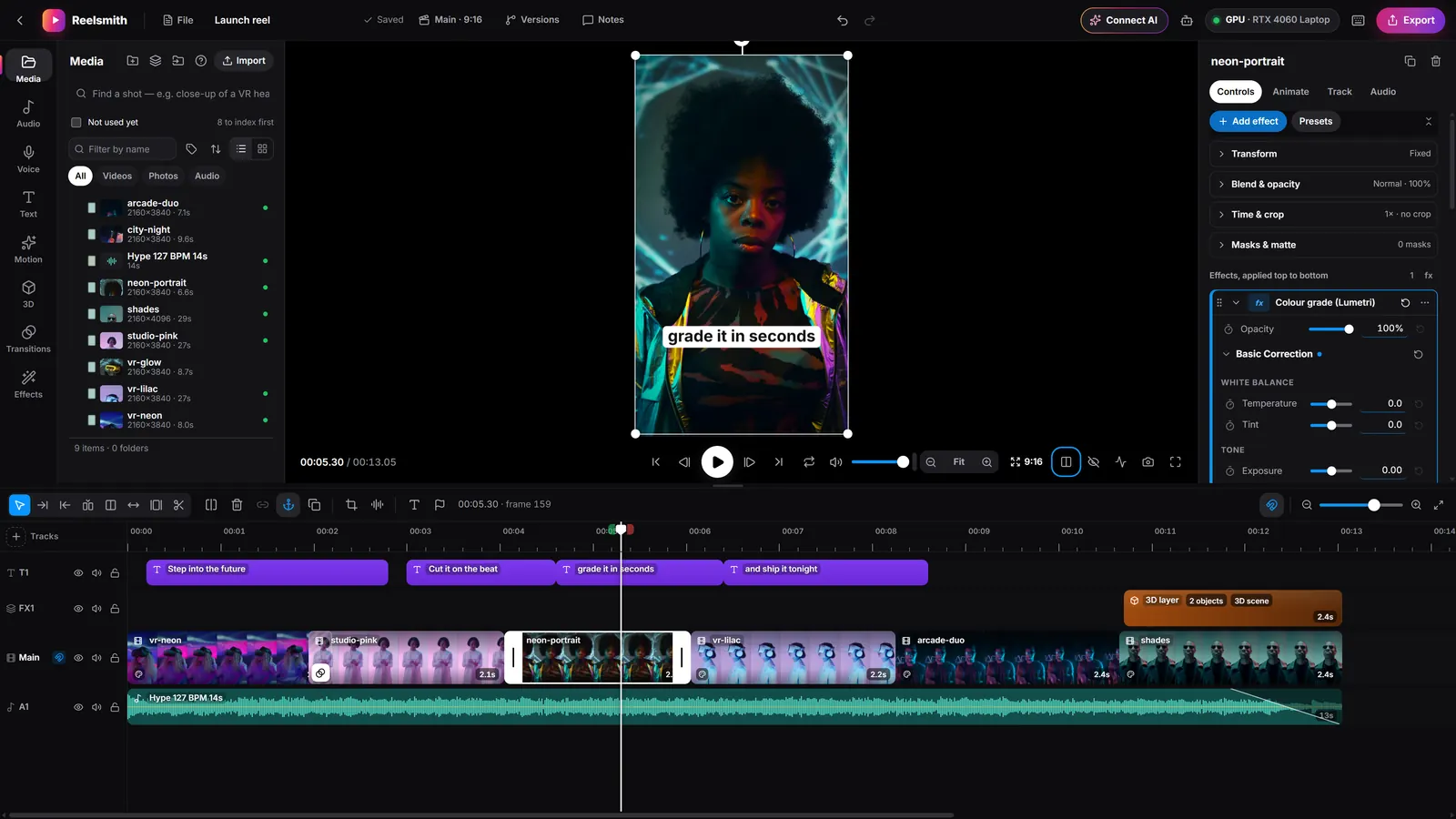
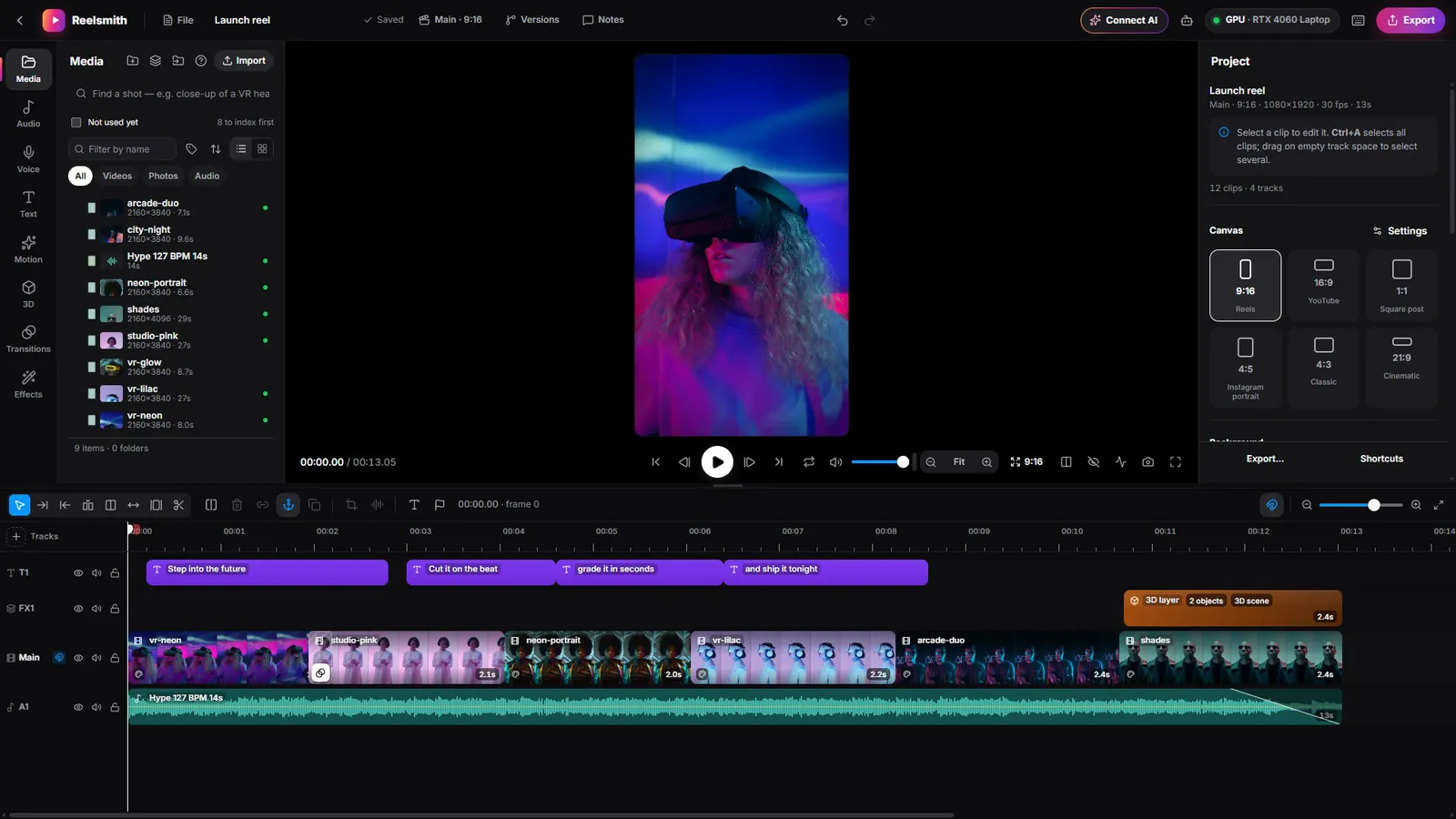
The Reelsmith editor playing a 9:16 reel: media panel, preview, project settings, and a timeline with a title, captions, a 3D layer, six video clips and a music track
Get started

Two steps to your first reel.

1

Try it now

Open the web app in Chrome or Edge, or install Reelsmith on Windows. Bring your clips and start cutting straight away.

2

Request activation

Create an account and choose Basic, Pro or Max. During the beta we switch every plan on by hand, usually within one working day. It is free, and we never ask for a card.

Features

Everything a short needs, in one editor.

From the first cut to the export: timeline, colour, motion and 3D, music and captions. These are real screens from Reelsmith, editing a real reel.

Editor

A real timeline that stays fast.

Drop clips on a magnetic main track, layer titles, music and overlays on free tracks, and keyframe anything. Playback and effects run on your GPU, so the preview keeps up.

  • Magnetic main track
  • 31 GPU transitions
  • Keyframes with easing
  • Versions to compare cuts
The Reelsmith editor with a 9:16 reel: media panel, preview with a caption, colour inspector and a timeline with text, 3D, video and music tracks
Colour

Grade like a colourist, check like one too.

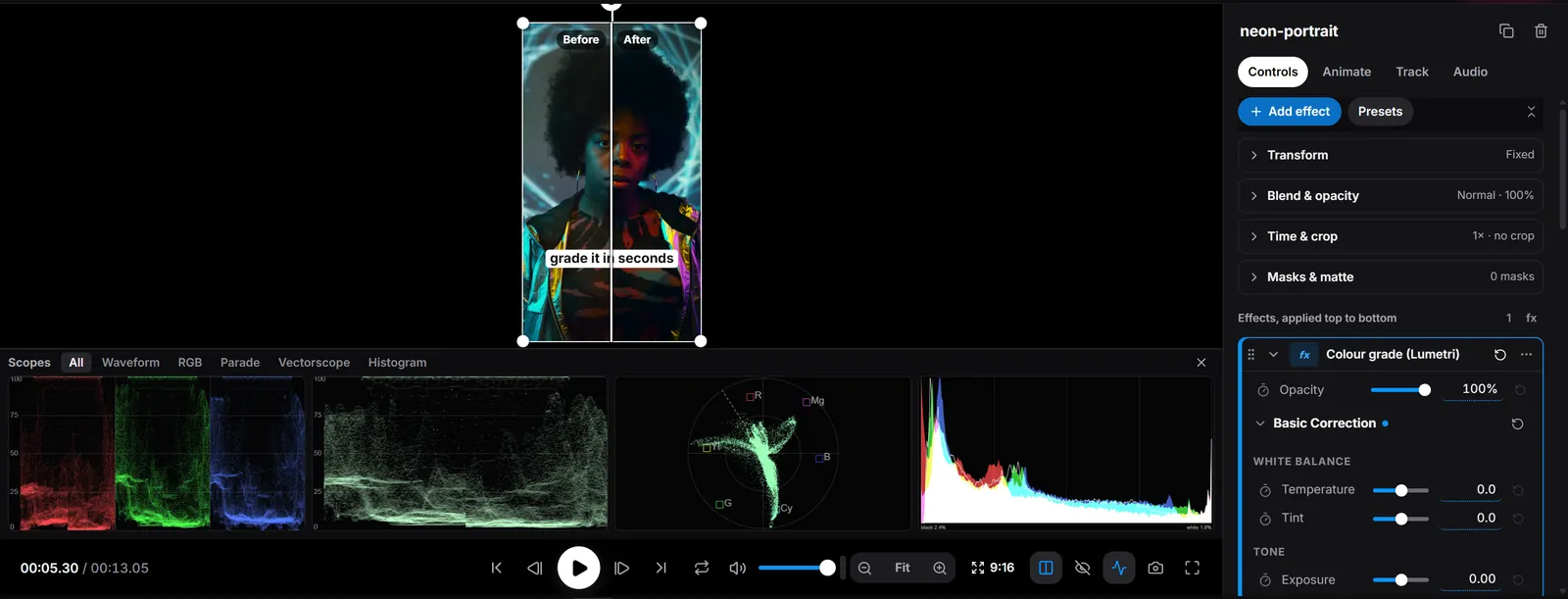
Lumetri-style colour wheels, curves, HSL and LUTs, with the waveform, parade, vectorscope and histogram one click away. Split the preview to see before and after.

  • Wheels, curves and .cube LUTs
  • Live scopes
  • Before and after split
  • Match shots from different phones
Colour grading in Reelsmith: a before and after split of the preview, four scopes, and the Colour grade (Lumetri) panel
Motion and 3D

Motion graphics and 3D, right in the shot.

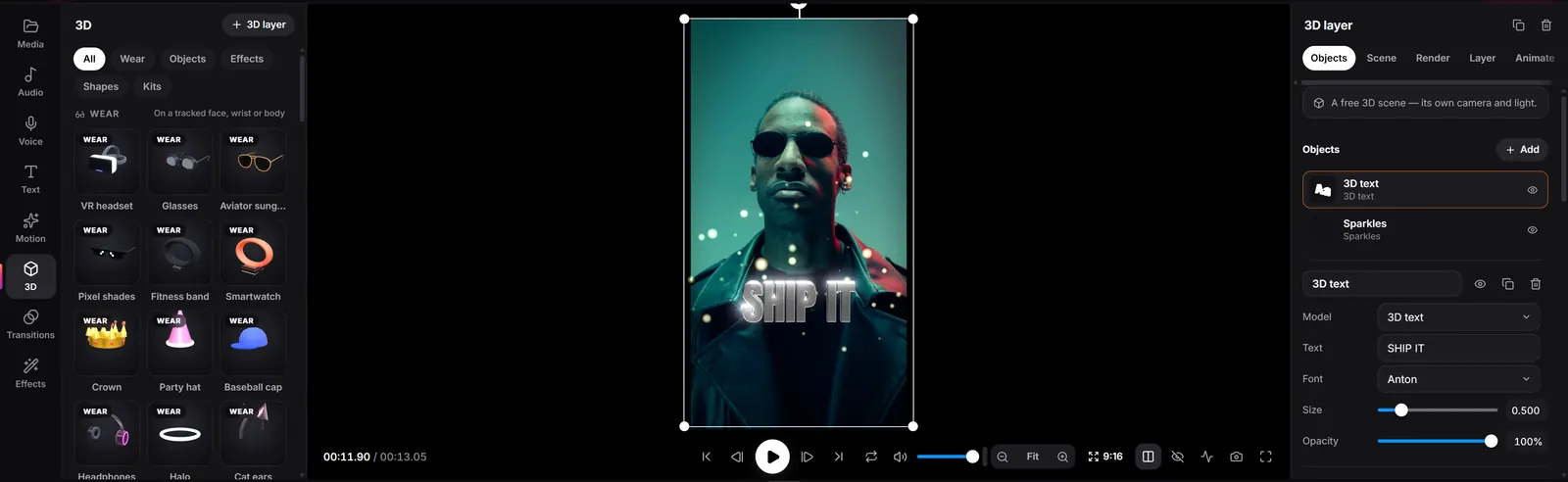
After Effects-style compositions, text animators and shape layers, plus a real 3D layer: chrome titles, props and glasses that follow tracked faces and hands.

  • 3D text and 45 models
  • Objects that follow faces and hands
  • Text animators
  • Shape layers and masks
The 3D panel in Reelsmith with wearable models, a chrome 3D title reading SHIP IT over the preview, and the 3D text settings
Music

Music made for your video.

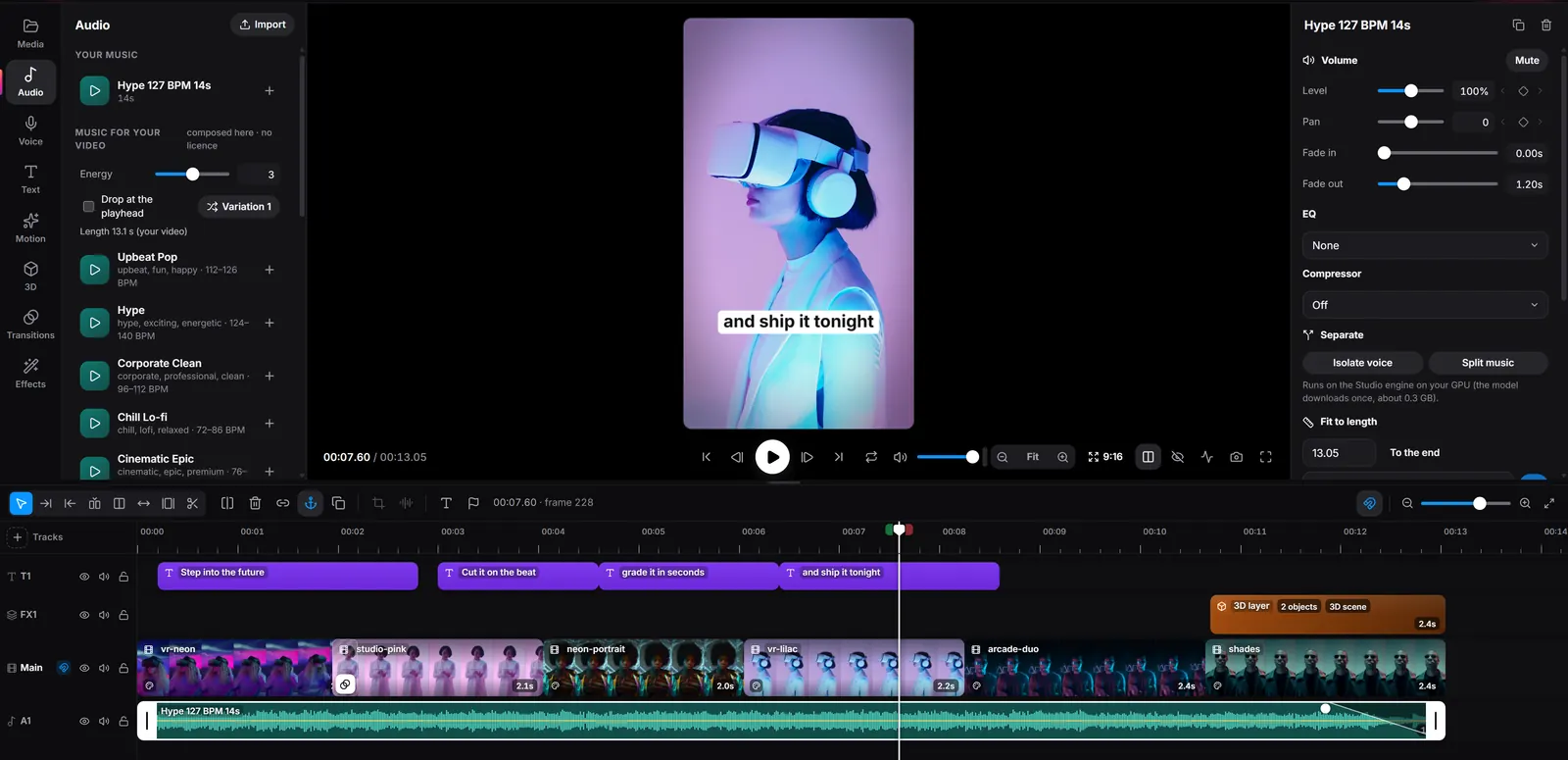
Compose a track in seven moods to the exact length of your cut, with the drop where you want it and no licence to worry about. Or bring your own song and fit it to length on the bar.

  • 7 moods, any length
  • Beat markers to cut on
  • Fit any song to length
  • Loudness ready for social
The Audio panel in Reelsmith: music made for your video in moods like Hype and Upbeat Pop, the volume and fade settings, and the music track on the timeline
Captions

Captions that people actually read.

Turn speech into captions on your own computer, with the spoken word highlighted. Pick from 12 text styles that sit inside the safe area of Reels, TikTok and Shorts.

  • Speech to text on device
  • Word-by-word highlight
  • 12 text styles
  • Sinhala and Tamil fonts
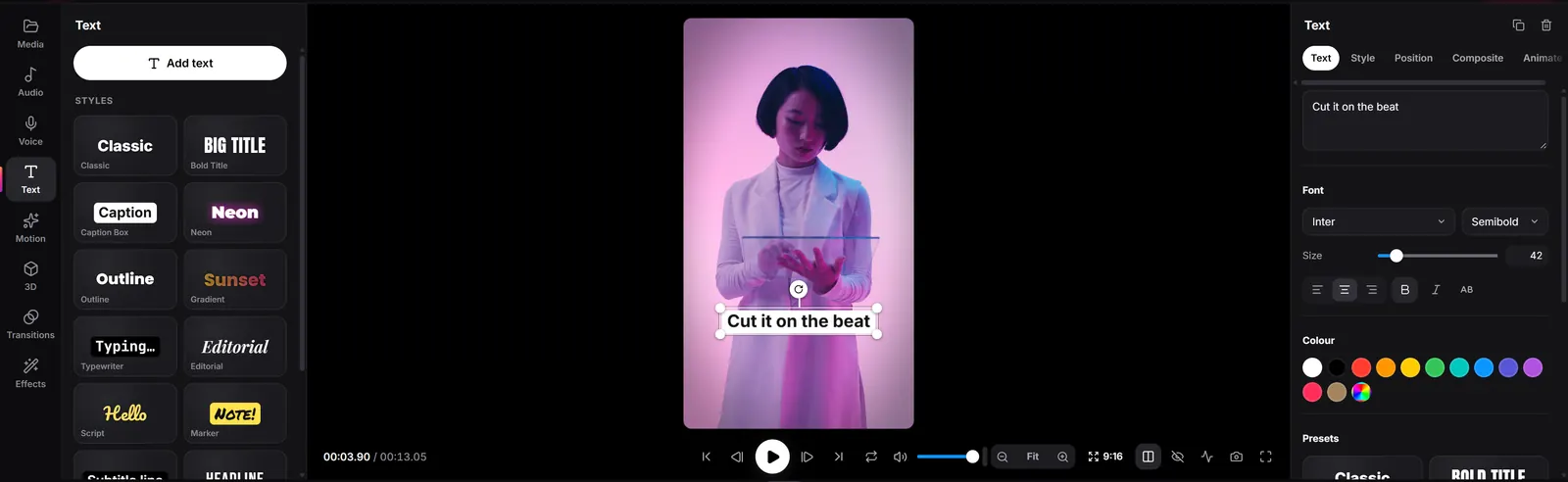
Captions in Reelsmith: the Text panel with styles such as Caption, Neon and Big Title, a caption on the preview and the text settings
On-device AI

AI that runs on your graphics card.

The AI tools in Reelsmith run on your own computer. Nothing is uploaded to be processed, and once a model is downloaded it works offline.

Speech to text

Whisper turns voice-overs and interviews into timed words and captions.

Whisper

AI cutout

Remove the background from a person, or paint any subject with the Roto Brush.

Segmentation

Tracking

Bodies, hands and faces, so titles and 3D objects stick to people.

Pose, hands, face

Voice-overs

14 built-in voices, or Studio voices you design or clone, in 10 languages.

Text to speech

Shot search

Find a shot by what it shows: "close-up of a VR headset".

SigLIP

Stems

Isolate a voice from the noise, or split a song into vocals, drums and bass.

Demucs

Your footage stays on your PC. We never see it.

How we keep it that way
AI agents over MCP

Let an AI agent make the first cut.

Tell an agent what you want in plain words. It imports your clips, cuts to the beat, adds titles and captions, then checks its own work, live on your timeline.

What is MCP?

MCP (Model Context Protocol) is like a USB port for AI. It lets assistants such as Claude Code, Codex or Gemini use the apps on your computer. Reelsmith speaks MCP, so your agent works with the same tools you use, and you can watch, undo or take over at any moment.

  1. ConnectClick Connect AI and copy the setup line into your agent.
  2. ApproveType the 6-character code. Only agents you approve get in.
  3. DirectAsk for a cut, a version, a colour pass. Undo anything.
  • Claude Code
  • Codex
  • Gemini CLI
  • Cursor
  • Any MCP client
  • Built-in Assistant

Agents are part of Pro and Max. During the beta, MCP agents connect through the Windows app.

Cut my 8 clips into a 30-second reel on the beat. Add a hook title and captions, then check it.

Agent
import_media 8 clips from your Launch folder1 credit
plan beat-synced 9:16 cut, 30 s2 credits
edit sequence, hook title, captions, music1 credit
look 6 frames across the cut2 credits
qc safe areas, captions, loudness: all clear2 credits

Done: 30 s at 127 BPM, every cut on a beat. It is all on your timeline. Undo any step with Ctrl+Z.

Templates and brand kits

Your brand, your templates.

Every title, caption look, transition, effect, sound and 3D kit in Reelsmith is a starting point. Use it as it is, save your own variation, or open the code and keep it for every project.

01 · Reuse

Build once, use in every project

Save any title, caption look, motion graphic, transition, effect, colour look, sound, music mood or 3D kit as a template. Keep it in one project or in All my projects, synced across your devices when you sign in.

02 · Brand kits

Brand kits in one click

Keep your logo, colours, fonts, caption look, Brand Sheet and favourite templates together. Preview every change before you apply a kit, restyle all captions if you choose, and undo the whole thing in one step.

03 · Shared library

You and your AI agents work from the same library

Connected AI agents browse, copy, edit and apply the same templates and brand kits you use. You approve once before an agent writes to All my projects, and imported code always stays off until you allow it.

Free keeps 10 templates in All my projects and 1 brand kit. Plans keep unlimited templates and 3 kits.

Read the templates and brand kits guide
How it works

Import. Edit. Export.

  1. Step 1

    Bring your footage

    Drop videos, photos and music into a 9:16, 16:9, 1:1 or 4:5 project. Your files stay on your computer.

  2. Step 2

    Edit, or direct an agent

    Cut, grade and animate by hand, or ask an AI agent for a first pass and polish what it makes. Every change can be undone.

  3. Step 3

    Export for every platform

    MP4 or WebM up to 4K with hardware encoding, and loudness set to -14 LUFS so it sounds right on Reels, TikTok and Shorts.

Privacy and security

Your footage stays on your PC.

Reelsmith edits, renders and runs its AI on your computer. Our servers only know enough to run your account.

Your videos, projects and exports never leave your computer.

There is no upload step and no cloud render. The work happens on your graphics card, and projects save to your own disk.

What we keep

  • Your account: name, email and sign-in method
  • Your plan, devices and agent credit counts
  • Sign-in and security logs
  • Never your footage, projects or prompts

How we protect it

  • Signed licences, checked on your device
  • You approve every AI agent with a code
  • Two-factor sign-in for our admins
  • Every admin action is logged
Read the security story
Pricing

Free during the beta.

Pick the plan that fits and request activation. No card, no automatic charges.

Basic

Cut, grade, ship.

Free during the beta
Request Basic
  • Full editor: cut, colour, motion and 3D, music, captions
  • On-device AI: transcribe, cutout, tracking, voice
  • Export up to 1080p
  • Core style presets and skills

Pro

Most popular

AI agents, with a monthly budget.

Free during the beta
Request Pro
  • Everything in Basic
  • Export up to 4K
  • All style presets and skills
  • In-app Assistant and MCP agents

Max

No ceiling on agents.

Free during the beta
Request Max
  • Everything in Pro
  • Unlimited agent use (fair use)
  • 3 agents connected at once
  • 3 devices

Compare every feature

FAQ

Questions, answered.

More on the pricing page, or ask us.

Do I pay anything during the beta?

No. There are no card payments in the beta. You request a plan, and we activate your account by hand, usually within one working day.

Does my footage leave my computer?

No. Editing, rendering and the AI models run on your own GPU. Only your account, plan, device list and credit counts are kept on our servers.

Can I use AI agents in the web app?

Not yet. During the beta, MCP agents connect through the Windows app. The web app has the full editor.

Which computers does it run on?

Any Windows 10 or 11 PC with a graphics card that supports WebGL2. A dedicated GPU with 4 GB or more is best for 4K and the AI tools. The web app runs in Chrome or Edge on any computer.

Your next reel starts here.

Open the web app or install it on Windows, then request activation. During the beta every plan is free.

Request activation